 SyncFolder
OneDrive
This location type connects directly to a OneDrive account through Microsoft's online service. No local OneDrive client is required, and OneDrive can be used as source, destination, or as a location of a 2-way sync task. After selecting this type and clicking Select drive/folder, the Choose a OneDrive folder popup opens.
Signing In
The first time, the popup asks you to sign in:
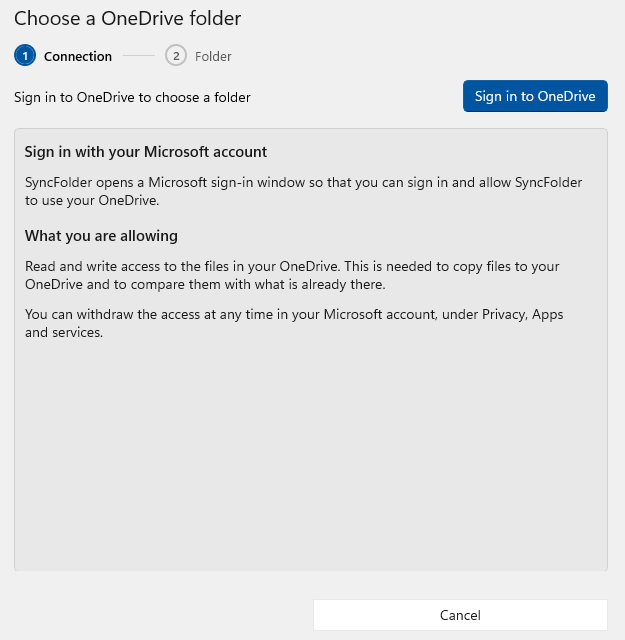
SyncFolder opens a Microsoft sign-in window so that you can sign in and allow SyncFolder to use your OneDrive.
What you are allowing: Read and write access to the files in your OneDrive. This is needed to copy files to your OneDrive and to compare them with what is already there. You can withdraw the access at any time in your Microsoft account, under Privacy, Apps and services.
- Click Sign in to OneDrive.
- Sign in with your Microsoft account in the window that opens and allow access.
- Back in the popup, the OneDrive folder structure is shown. Browse to the desired folder and confirm the selection. You can also create a new folder here.
Sign-in is handled by Microsoft's own sign-in page. SyncFolder never sees or stores your OneDrive password.
Changing the Folder Later
Click Select drive/folder again to choose a different folder. If your sign-in is still valid, the popup opens directly at the folder structure without asking you to sign in again.
Possible Problems
| Message | What to do |
|---|---|
| The account is no longer registered! First, authenticate using the webpage that opens in the browser. Then select the OneDrive folder in the application. | Sign in again and reselect the folder. |
| Account for the target location is not registered (task result) | Open the task, click Select drive/folder and sign in again. |
| The configured folder is no longer available on OneDrive: … | The folder was deleted or renamed in OneDrive. Select the folder again. |
| OneDrive does not respond when retrieving the folders. | Check your internet connection and try again later. |
| Authentication interrupted | The sign-in window was closed before signing in was completed. Try again. |
Related topics: Storage Location · Google Drive · Permissions